Managing Color Profile Shifts When Sharing High-Fidelity Graphics Across Different Browser Rendering Engines
Managing Color Profile Shifts When Sharing High-Fidelity Graphics Across Different Browser Rendering Engines
Today’s site design, photography, branding, digital publication and online creative collaboration all depend on high-quality digital graphics. If you’re dealing with intricate graphics, marketing assets or professionally edited images, then designers spend a lot of time making sure that the colours look right on different devices and displays. No matter how much you prepare, users will still likely find that the identical visual looks different in different browsers and colors are surprising. While a picture could seem bright on one browser, it could be a bit flat, oversaturated, or warm in another. These variances are often due to changes in browser rendering engines, color management solutions, display capabilities, and embedded color profile processing. Knowing how browsers handle color information allows developers to keep the visual consistency while delivering high quality visuals in the various web settings.
Digital Color Profiles Explained
A color profile is a mapping between color numbers and color as you really see it on a screen . Modern image files often have embedded color profiles that define how those colors are to be perceived, rather than just recording red, green and blue numbers. This extra data enables any compatible application to draw visuals more correctly on various devices. Depending on the program or hardware in use, the same image data can yield vastly different visual effects without accurate interpretation of color profiles. Thus good color management depends on well embedded image profiles and proper interpretation by the viewing application.
How graphics are processed by browser rendering engines.
All current browsers use a rendering engine to render web pages, pictures, animations, fonts and multimedia. As images are loaded, the rendering engine examines the embedded metadata, decodes image formats, applies color management if supported, and converts image colors to values suitable for the connected display. Browser developers try their best to follow common web standards, although implementations of color management vary slightly from rendering engine to rendering engine. Optimization techniques, graphics libraries and display handling might vary and this may affect how color information is handled, especially for visuals that have been professionally made with wide color ranges or complicated embedded profiles.
Why do colors look different among browsers
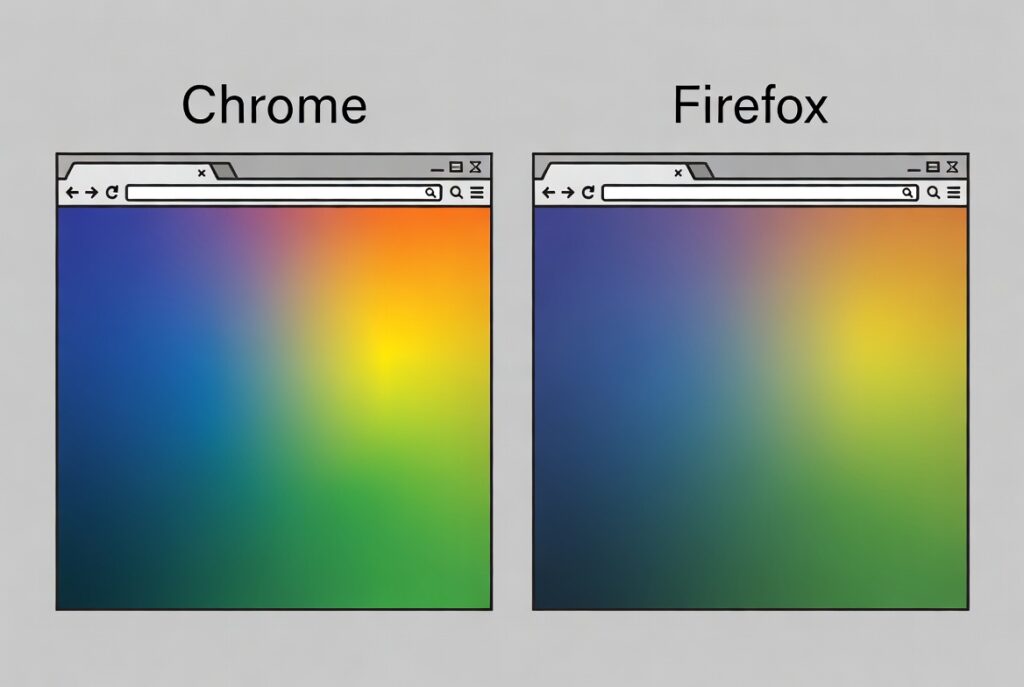
Color shifts usually happen because browsers interpret and translate picture color data in different ways, not because the image itself is changed. Supported integrated color profiles, certain reduced color processing, under some conditions, may be implemented in some browsers. Visual differences may also be caused by different hardware acceleration, interaction with graphics drivers and the color management of the operating system. If a browser incorrectly identifies the color space or ignores the embedded profile information, colors may appear less saturated, too vivid, or slightly shifted in hue. These differences are particularly evident with visuals that have subtle gradients, brand colours or photographic edits done by a professional.
Why Embedded Color Profiles are Important
If the image itself has a suitable color profile (embedded) it will be much more likely to be displayed consistently across different browsers and OSs. The integrated profile tells compatible rendering engines how to convert the stored colour values for display. Browsers have to guess the color space of images without embedded profiles, thus they’re more likely to be interpreted inconsistently. An integrated profile can’t pick up every compatibility variation, but they do provide crucial recommendations to help browsers display color more properly across a range of viewing contexts and display technologies.
Impact of Display Hardware and Operating System
Browser rendering is merely one part of the whole color reproduction process. Display calibration, monitor capabilities, graphics hardware and the color management of operating systems all influence the final output of high fidelity graphics. Wide gamut monitors are capable of showing a wider range of colors than regular displays. Also, operating systems perform their own color conversions before images are displayed. Also, depending on the hardware arrangement, extra changes can be made by graphics drivers. So even the same browser on various systems may render somewhat different colors due to variances in other parts of the display pipeline.
Challenges of Collaborative Creative Workflows
When numerous designers, photographers, developers and clients are involved, it is critical to maintain color consistency as they all see the same images on different browsers and devices. Designs authorized on one workstation can seem quite different on another, leading to ambiguity in collaborative review procedures. These discrepancies are important for marketing materials, product photographs, user interface elements and company branding assets, where accurate color reproduction is typically of commercial importance. By establishing common review environments and consistent color management procedures throughout creative workflows, we can decrease the need for unnecessary changes caused by browser-dependent rendering variations.
Best Practices for Visual Consistency Maintenance
The first step to reliable color reproduction in graphics is to use standard color spaces appropriate for the Web and ensure that pictures have accurate embedded color profiles. Regular display calibration keeps editing environments predictable, minimizing differences when prepping images. Designers should preview key graphics in different browsers and devices before release so that potential rendering variations can be caught early on. Updating browsers, graphics drivers, and operating systems further increases compatibility since browser developers are always improving color management behavior to help accommodate the developing standards of the web and new display technology.
Building Solid Cross-Browser Color Workflows
As browser rendering engines get better color management and more extensive display capabilities will become more uniform across platforms. But variations in rendering behavior, processing on the operating system and hardware characteristics will continue to be key factors for developers of visually-critical web content. Organizations that focus on consistent color operations, correct picture preparation, frequent compatibility testing and appropriate display management will produce more predictable visual results across varied browsing situations. Designers and developers who understand how color profiles, browser rendering engines and display technologies interact can reduce the incidence of unexpected hue changes and preserve the intended appearance of high-fidelity visuals for consumers regardless of the browser they use.