Resolving Certificate Chain Errors When Accessing Legacy Web Portals via Modern Secure Browsers
Resolving Certificate Chain Errors When Accessing Legacy Web Portals via Modern Secure Browsers
Many organizations still run old web portals to support internal operations, historical data, specialist business applications, and long-standing administrative systems. Many of these platforms were created at a time when standards for security and certificate management were different, and they may continue to operate reliably. More and more current browsers are enforcing stricter transport security standards, and users trying to access older web portals are running into more frequent certificate chain issues. Such alerts might hinder secure connections, interrupt corporate activities, and cast doubt on the website’s own reliability. In many cases the problem is not just an expired certificate, but an incomplete/outdated certificate chain that no longer fulfills the current browser validation standards. Knowing how certificate chains work allows administrators to update legacy services and remain compatible with today’s security-oriented browsers.
Understanding Chains of Digital Certificates
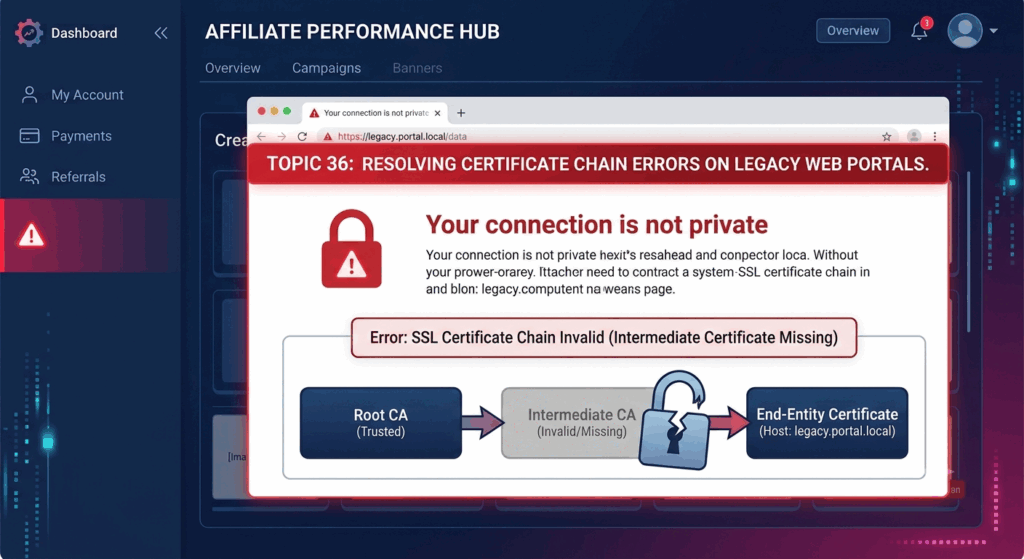
A digital certificate is used to verify the identity of a web site . This in turn allows browsers to create an encrypted connection to web servers . Secure connections usually rely on a chain of certificates that links the website certificate to a chain of one or more intermediate certificates that lead to a trusted root certificate that the browser or operating system already has stored, rather than depending on just one certificate. The browser validates each certificate in the sequence during the construction of the connection before it accepts the encrypted session. If there are any missing, invalid or untrusted certificates in the chain, the browser cannot verify the legitimacy of the website and shows a security alert.
Why Compatibility Issues Occur With Legacy Web Portals
Many historical web portals came online years before today’s certificate management methods were the norm. At the time, browsers were generally tolerant of incomplete certificate chains or would automatically fetch missing intermediate certificates during the connection establishment. Modern browsers do a much more severe validation to mitigate security concerns from misconfigured servers and counterfeit certificates. This can cause certificate chain issues in legacy systems that were previously connected, even though the basic functionality has not changed. The increased focus on safe communication has revealed configuration holes that previous versions of browsers sometimes overlooked.
Intermediate Certificates Role
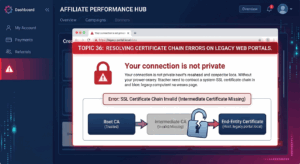
Intermediate certificates are trusted bridges between website certificates and widely known root certificate authorities . They can help to distribute trust in a secure manner and reduce the direct reliance on root certificates for every single website certificate issued. In order for the browsers to validate the whole trust chain, the web servers need to give the right intermediate certificates as part of the secure connection process. If these intermediate certificates are missing, out of date or misconfigured then modern browsers will not be able to finish the validation process effectively. But, if the accompanying certificate chain is not complete, the website certificate loses its validity.
How Modern Browsers Authenticate Secure Connections
Modern browsers do a lot of checking before they start talking to websites over encrypted channels . In addition, browsers test for: a valid certificate chain, a certificate signed by a trusted authority, valid digital signatures, valid cryptographic techniques, a hostname that matches the certificate, and whether the certificate is revoked (if the browser supports it). These extensive validation steps help protect users from impersonation attacks, compromised certificates and insecure server setups. Consequently, legacy portals that were created based on the security expectations of the past could meet compatibility issues since they do not adhere to the more demanding verification criteria required by newer versions of browsers.
Common Certificate Chain Errors – Explained
Certificate chain difficulties in different browsers generally generate similar warnings, however the phrasing may vary significantly. Users may be shown errors regarding incomplete trust chains, unrecognized certificate authorities, missing intermediate certificates, or improper server identity verification. Some browsers just block access until the user acknowledges the security risk, while others refuse to connect to highly unsafe configurations with no override. If the portal is working fine on older devices but not on most recently updated browsers, then the first thing to look at should be the certificate chain settings.
Importance of Server Configuration
Proper server configuration is a major factor in certificate validation success. Even if the website’s certificate is genuine and issued by a trusted certificate authority, administrators should be ready to provide all certificates in the correct order throughout the secure connection process. Configuration issues, such as certificate installation errors, server updates, or migration activities, might result in incomplete certificate chains even if the encryption settings are otherwise appropriate. The regular post-certificate renewal check will guarantee that fresh certificates are shipped with the correct intermediate certificates that match current browser requirements.
Best Practices for Compatibility
Organizations with historical web portals should evaluate their certificate setups routinely, and not wait for connection issues to occur. Modern server software is more compatible with current encryption techniques and standards for handling certificates. Administrators should examine the full certificate chain following renewals, infrastructure upgrades, or hosting migrations to uncover configuration errors early and avoid user-facing security warnings. Testing the portals on several browsers and operating systems further verifies that certificate validation succeeds consistently across different client environments, while addressing the growing security requirements of browsers.
Securing Web Services for the Future
With browser vendors continuing to improve transport security, certificate validation standards will only get tighter and tighter. Therefore, legacy web applications that will be in use for many years require both functional and security upkeep. Understanding the certificate chain architecture, intermediate certificate management, browser validation procedures, and server configuration requirements allow organizations to update their existing infrastructure without replacing critical legacy applications. Administrators are able to proactively manage certificates, regularly test compatibility, quickly update software, and pay close attention to evolving security standards to ensure that legacy web portals continue to provide secure and reliable access that meets the expectations of modern secure browsers and protects users with properly validated encrypted connections.