How Local DNS Caching Causes Persistent Routing Errors on Recently Migrated Web Applications
How Local DNS Caching Causes Persistent Routing Errors on Recently Migrated Web Applications
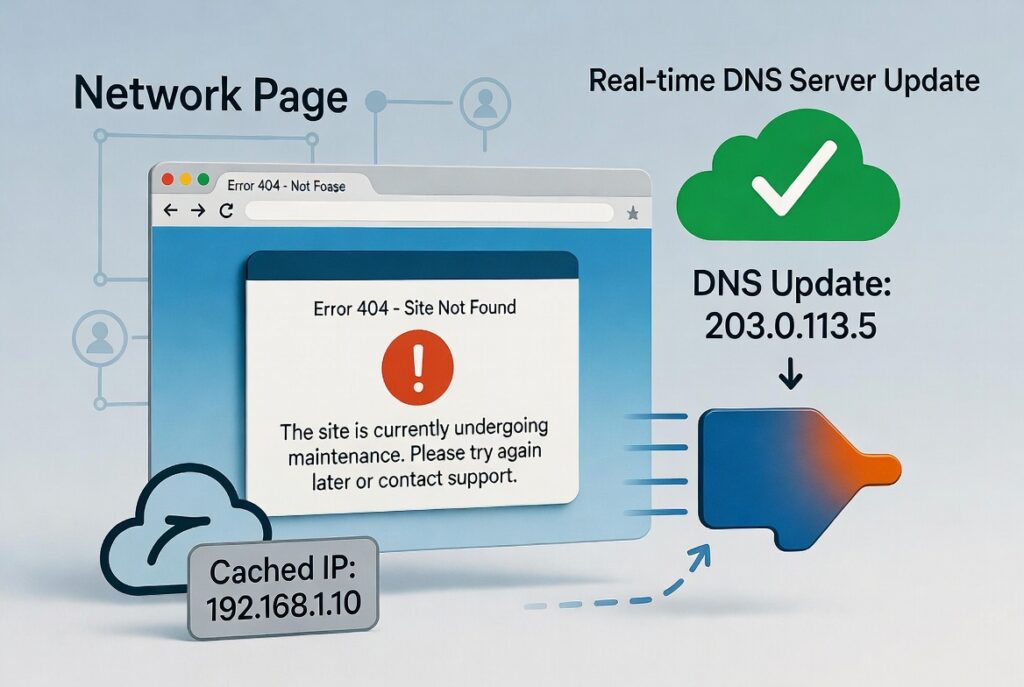
Web application migrations are becoming more popular as firms upgrade infrastructure, increase performance, expand globally or relocate services between hosting environments. Even if the migration procedure is successful on the server side, routing issues, unavailable websites or connections to old servers may still occur long after the move has been completed. Often these are not generated by the online application, but by local Domain Name System (DNS) caching. DNS caching enhances surfing speed by saving the results of domain name lookups for a period of time so that the same network requests are not made repeatedly. However, when a web service moves to a different server or network address, cached DNS information can continue to route users to outmoded sites until the saved records expire or are refreshed. If you understand how local DNS caching works, you’ll be better able to help troubleshoot why some routing difficulties remain after you move your infrastructure around.
How DNS Works in Web Browsing – Learning
The Domain Name System acts as the internet’s address directory, converting human-friendly domain names into the numeric network addresses that computers use for communication. When a user types in a web site address into a browser , the operating system or browser will query the DNS services to find the correct destination server . The translation process is usually done in milliseconds and is transparent to the user. Without DNS, you’d have to type long numerical addresses instead of friendly domain names to get to every website . DNS requests happen all the time during typical surfing , so caching methods are vital for enhancing performance and decreasing unnecessary network traffic .
How Local DNS Caching Can Improve Performance
Local DNS caching temporarily retains information about recently resolved domains on the user’s device. Instead of querying external DNS servers every time a website is accessed, the operating system tries to get cached information from its own local cache whenever possible. This eliminates the latency for lookups, and speeds up the loading of pages for sites that are visited often, reducing the network traffic. Browsers, operating systems, routers and internet service providers may all independently keep their own DNS cache, generating many levels of temporary storage that all contribute to speedier browsing. These cached records are useful in typical situations, but can be problematic in the event of major infrastructure changes.
Why Migration of Web Application Causes Routing Issues
In the process of migrating a web application, administrators often make changes to DNS records to point to new servers or hosting environments. These updates are rapidly propagated to the authoritative DNS servers but devices that have cached the old records may continue to use the old routing information until their local cache expires. This means that some users will be able to access the migrated application successfully right away, while others will still connect to the previous infrastructure. Technically the transfer can be complete, but cached DNS information can still affect user traffic to different locations, which often leads to confusion because of this inconsistency.
Detecting Symptoms of DNS Cache Problems
Routing difficulties from stale DNS caches may lead to inconsistent behaviour on different devices and networks. A website that has been moved might load OK on one PC but not on another PC on the same Internet connection. The new infrastructure will be successfully rolled out but some customers may see outdated application versions, security certificate warnings, or connection difficulties. However, mobile devices on cellular networks are capable of accessing the latest program while desktop computers are still accessing outdated servers via cached data. The inconsistent experiences strongly suggest DNS propagation, or local cache persistence, not application failure.
Caching DNS at Several Tiers
Many consumers think that DNS caching happens simply in their operating system. But there are usually numerous independent cache layers involved in each lookup process. Modern web browsers contain internal DNS caches that cache results for subsequent surfing during an active browsing session. Home routers may cache query results for connected devices for a short time. Internet service providers often operate huge shared DNS caches that serve thousands of users simultaneously. Every caching layer has its own expiry schedule, so you may get updated DNS information at different times depending on where the stale record is being held. These numerous levels help you troubleshoot more easily if routing inconsistencies remain after migration.
The impact of cache expiration policies
Each DNS record has an expiration value that indicates how long cached information should be considered valid until it must be refreshed by a new lookup. Longer cache lifetimes boost performance and minimize network traffic under normal operation, but also delay detection of infrastructure changes during migrations. Shorter expiration values permit more responsiveness to changes , but make lookups and network activity more frequent . Often cache times are shortened prior to a planned relocation to prevent propagation lag. Good control of these timing policies allows the system to provide good browsing performance, while still adopting routing updates in a timely manner after substantial infrastructure changes.
Best Practices for a Smooth DNS Migration
Successful web application migrations require careful preparation beyond just server deployment. Pre-scheduling DNS changes, checking infrastructure readiness prior to making record changes, and monitoring traffic during propagation all contribute to making transitions smoother. Administrators should also, when possible, keep temporary compatibility between old and new environments so that users with old cached information continue to have access to critical services until the caches naturally expire. Testing from several devices and network locations on a regular basis also validates that the revised routing information has propagated successfully across different caching layers.
Developing Trustworthy Migration Strategies
DNS caching is one of the big optimizations that allows us to talk to the internet fast and efficiently but it also makes the web app conversion a little bit complicated (temporarily). Organizations with insight into how local caches, browser behavior, operating systems, routers and DNS infrastructure interact can better anticipate routing problems before they impact consumers. Careful migration planning, regulated cache management, progressive infrastructure changes, and extensive verification procedures considerably prevent post-migration disturbance. Knowledge of the interplay between DNS caching and routing behavior enables administrators to develop reliable migration workflows that maintain application availability and bring users to updated services as quickly and as reliably as feasible over heterogeneous network environments.