Overcoming Max Path Length Limitations When Syncing Deeply Nested Cloud Directories to Local Windows File Systems
Overcoming Max Path Length Limitations When Syncing Deeply Nested Cloud Directories to Local Windows File Systems
Cloud storage is the de facto standard to store, share and synchronize content across various devices and users. People and companies commonly arrange data in complex folder systems related to projects, departments, dates and document types. These complex directory structures are useful for organizing in a cloud environment, but might cause unforeseen problems when synchronized to local file systems on Windows. Another typical problem is related to the maximum path length limit. Sometimes the total length of the folder name, including the subdirectory names and the file name is too long for some applications or system components to handle. Newer versions of Windows offer better support for longer file paths but still compatibility gaps between software, sync clients and legacy apps. Knowing these constraints, users can create more stable file structures and not have synchronization issues while using cloud storage.
Windows File Path Lengths Explained
On a Windows system, each file has a full file path that indicates the drive letter, all the folders in the directory structure, and the filename itself. As users create more nested folders with descriptive titles, the total path length steadily increases. For many Windows components and apps, there have been historically quite stringent path length limitations that limited how many levels deep you could nest your folders. While newer Windows environments offer expanded route support in some situations, it does not mean an application automatically benefits from that change. As a result, synchronization software still faces compatibility challenges with lengthy directory structures developed in cloud storage environments.
Why Cloud Storage Promotes Deep Directory Structures
Because storage space is less obvious on cloud platforms than on traditional local disks, it’s possible to organize material into elaborate hierarchical folder structures. Teams commonly tag files by department, client, project, fiscal year, document type, revision number, and approval status. But the more layers of organization you have, the longer the directory routes get over time. Most cloud programs present folders to users regardless of the limitations of the underlying operating system, therefore users are often unaware that their directory structures have exceeded realistic restrictions until synchronization begins. Thus, the convenience of large cloud organization sometimes conflicts with the technical restrictions of local file systems.
How Synchronization Clients Work with Long Paths
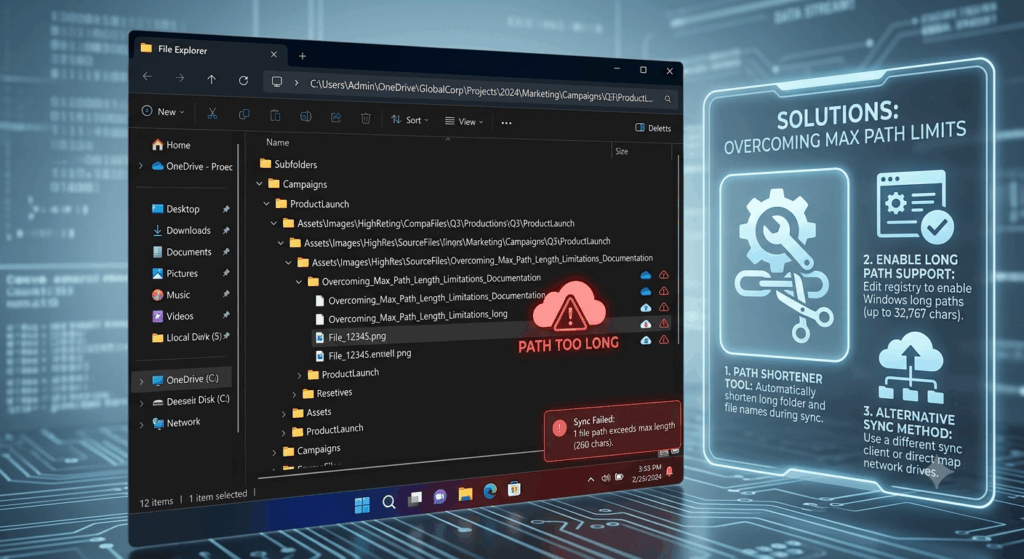
Cloud synchronization apps constantly compare the remote directory to local storage, in order to keep the file structures consistent between connected devices. During synchronization, the client must recreate all the folder and file names exactly as they are stored in the cloud environment. If a produced local path is too long, the synchronization procedure may skip impacted files, generate error warnings, or retry failed transfers again. Some synchronization clients will provide thorough warnings which pinpoint the offending pathways . Others will merely indicate incomplete synchronization , without precisely describing the underlying cause . Such inconsistencies can make the diagnosis more difficult, especially if only a few highly nested files are involved.
Path Length Problems
If a user is affected by path length constraints, they will often see files that never sync, even when other files in the same directory do. Some folders in cloud storage may seem empty, yet they do have documents in them. Sometimes in the sync logs, you’ll see invalid file names, unreachable paths or unexpected transfer failures and there’s no evident issue with the hardware or network. File actions (rename, move, delete) on deeply nested documents may also fail as the operating system may not be able to handle the full route efficiently. Detection of these recurrent symptoms allows to disentangle path length limits from unrelated synchronization or storage difficulties.
The Effect on Collaboration and Collective Projects
This is especially true in collaborative contexts when several users work on shared cloud repositories, and deep directory hierarchies become a problem. Team members may use different operating systems, sync apps and software versions. They have differing capacities for path length. A folder hierarchy that is fine for one user may be unreadable to another, if their local system has stricter compatibility rules. As shared projects evolve, the recurrent nesting of modifications, meeting notes, archival materials and supporting documentation eventually increases path complexity. However, without consistent organizational methods, synchronization errors can spread throughout collaborative workflows, hindering access to critical project resources.
Strategies for Path Complexity Reduction
If you want to circumvent path length limits, then the most dependable way is to manage directory depth proactively. Short but relevant folder names help to keep the cumulative path length down while maintaining organization. Less nesting levels are easier to traverse and reduce the difficulty of synchronization on various devices. Clear naming conventions are helpful for clarity with folder name abbreviations. If you look at the traditional directory structures on a regular basis, you will see layers of organization that no longer have any practical value. These maintenance procedures improve the reliability of synchronization while maintaining an organized cloud storage environment for long-term file management.
Windows Modern Enhancements and Compatibility Considerations
The latest releases of Windows provided increased path length support to address many of the hitherto limited depths of nested directories. Continued support, however, is not simply a function of the operating system itself, but also of application compatibility, synchronization software implementation, and individual program design. Some current apps deal with longer paths with no problems, however some older utilities still use the traditional file handling methods. So, organizations deploying a blend of modern and legacy software should create directory structures that will be compatible across their whole technology landscape rather than assuming extended paths will be supported universally.
Building a Sustainable Cloud File Organization
The key to long-term cloud storage success is finding the right balance between meticulous organization and real-world compatibility with a wide range of devices and apps. Well-designed directory structures reduce synchronization errors, simplify navigation, and promote collaboration without losing scalability as projects grow over time. Consistent examination of folder structures, uniform naming conventions, effective management of synchronization, and knowledge of local operating system constraints allow for reliable workflows with cloud storage. Through an understanding of the maximum path length constraints on synchronization between cloud platforms and local Windows file systems, users can establish structured digital spaces that are accessible, efficient, and dependable, regardless of the scale of a project or the complexity of an organization.