Managing Timezone Offset Errors in Web Calendars Caused by Conflicting OS and Browser Locales
Managing Timezone Offset Errors in Web Calendars Caused by Conflicting OS and Browser Locales
Web calendar apps are now indispensable tools for scheduling meetings, managing projects, planning events and worldwide collaboration. Whether they are part of productivity suites, project management platforms, or standalone scheduling services, these calendars depend on correct date and time calculations so that appointments occur precisely as planned. Modern browsers and operating systems offer web applications with information about timezones and regions, so that events can be displayed in the user’s local time and regional settings. However, difficulties might develop if the operating system timezone, browser locale, language settings or regional configurations do not match each other. These conflicts might lead to unanticipated timezone offset issues that make an appointment show up at the wrong time, change recurring events unexpectedly or reminders to pop up earlier or later than expected. Knowing how operating systems, browsers and web calendars handle date and time information helps users and developers keep correct schedules across a broad range of computer contexts.
Timezones and Locales Explained
Timezones and locations are two concepts that are sometimes spoken together, yet they serve separate roles in modern computing systems. The timezone tells you how much you need to offset the local time from Coordinated Universal Time. This allows your system to figure out what the current time should be, based on where you are. A locale specifies regional preferences for things like language, date formatting, number style, calendars, and cultural customs. Web applications usually accept both values from the browser to display information in a way the user is used to. These settings often work in conjunction with each other but when they don’t match it becomes difficult to decipher time sensitive information.
How Event Times are Handled by Web Calendars
Most web calendars do not keep appointment information as a permanent appointment in a specific local clock, but instead use standardized time representations to store event information. The browser also provides the current timezone information when loading a calendar so that saved events can be translated to the user’s local time before displaying. This dynamic conversion enables travelers and distributed teams to view the same events in their different locations. So, it is important that the browser, operating system, and calendar application all have the same idea about the current timezone setup in order to schedule accurately.
Why Configuration Conflicts Happen
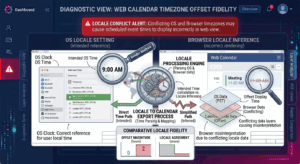
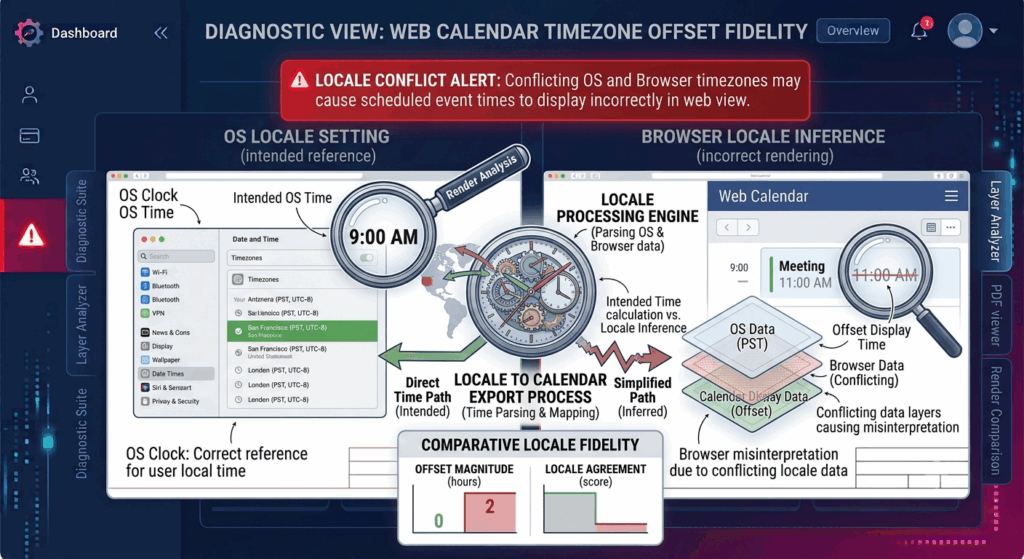
Timezone offset problems are common when there is a conflict between multiple geographic settings of system components. The browser may be set to a different language or geographical preference than the operating system is configured for. Virtual machines and remote desktop sessions, corporate device control policies and manually altered timezone settings can make this relationship even more complicated. Sometimes the browsers just grab the timezone info directly from the OS . But they also apply different locale settings chosen by the user . These settings can be independent, and this can cause web applications to interpret date and time information differently than expected.
The effect of daylight savings time.
Adding complexity is daylight saving time in many countries, where the offset from a timezone changes automatically during parts of the year. Operating systems update their timezone databases often to account for changes in daylight savings and regional laws . Event estimations may be temporarily wrong if browser software, operating system changes or online apps rely on unreliable timezone data. Meetings involving international teams are particularly prone to problems, since regions can advance or regress to different dates, or not move at all, generating temporary discrepancies in projected timezone offsets.
Symptoms of Common Time Zone Offset Errors
A frequent symptom users have with timezone issues is appointments appearing an hour or several hours before or after the actual appointment time. Meeting invites may appear accurately on one device, yet appear as different times on another. Sometimes calendar reminders can fire too early and recurring events can slowly drift out of sync after daylight saving time adjustments. If you access shared calendars from more than one browser, event times can become inconsistent if the regional settings on the devices are not the same. These symptoms usually point to setup mismatches rather than corruption of the calendar data itself that is saved.
Why It Is Important to Keep Your Browser and Operating System in Sync
For reliable calendar functionality, consistent regional configuration of the computing environment is required. Browsers depend on the operating system services for correct timezone determination and operating systems are kept up to date with the regional databases through software upgrades. This helps keep the two in sync and reduces the likelihood of contradictory readings of date and time information . A benefit for developers is testing the calendar behavior in different browsers, operating systems, and regional settings to ensure that events are converted properly in different deployment environments.
Reliability Best Practices for Scheduling
By ensuring that all devices used for scheduling have the same regional settings, organizations and individual users can mitigate timezone-related problems. Keeping your operating system and browser up to date ensures you have the latest timezone definitions and daylight saving time modifications. Developers should test scheduling apps with sample foreign configurations prior to deployment, to ensure that any conversion inconsistencies are identified. Further long-term scheduling reliability enhancements are achieved by monitoring the behavior of repeating events over seasonal timezone shifts. These methods help to keep the timing of events consistent, no matter where the device is located or how the browser is implemented.
Developing Accurate Cross-Platform Calendar Systems
Calendar synchronization is becoming more and more essential in business, education, healthcare and remote work, with global collaboration extending across many nations and time zones. Web applications that know how to connect operating system timezones, browser locales, regional formatting, and common event storage can provide consistent scheduling experiences across a range of computing settings. As international timekeeping and regional computing preferences make the web calendar more complex, developers and organizations can create robust web calendar systems by paying attention to configuration, testing for compatibility, performing routine software maintenance, and understanding the principles of timezone conversion to ensure that appointments are accurate, reminders are reliable, and events are scheduled consistently.