Why Browser-Based PDF Viewers Fail to Render Complex Vector Layers Generated by CAD Software
Why Browser-Based PDF Viewers Fail to Render Complex Vector Layers Generated by CAD Software
Portable Document Format (PDF) files are the standard for sharing technical drawings, engineering plans, architectural layouts, manufacturing paperwork, and design specifications on a variety of devices and operating systems. Computer-aided design (CAD) software often exports projects as PDF documents so that clients, contractors and project teams can use them without specific design tools, yet with exact vector drawings. PDF viewers are built into most browsers today, so you do not need to install anything else to open these kinds of documents. These viewers work fine on common documents, but typically struggle to draw extremely intricate vector layers created by professional CAD software. However, the PDF may open properly but users may experience missing objects, unfinished drawings, delayed rendering, distorted line work or blank pages. Understanding the reasons behind these limitations in browser-based PDF viewers allows developers and technical experts to select the right procedures for working with complicated engineering papers.
Understanding Vector Graphics in CAD Drawings
Raster images carry information visually as individual pixels . Vector graphics are mathematical descriptions of objects in terms of lines , curves , coordinates and geometric shapes . CAD software is strongly dependent on vector technology since engineering drawings must be very accurate at any magnification. All line segments, dimensions, symbols, annotations and structural elements are still mathematically specified . Drawings can be scaled without loss of clarity . Complex technological projects may have millions of vector elements in several layers, therefore the output PDF will be far more complex than normal text documents or basic graphics.
How PDF Viewers Work in Browsers
PDF viewers included into browsers are meant to enable regular users to view documents quickly and conveniently. Their focus is on fast loading, wide compatibility, reactive navigation, and effective use of memory on a wide range of hardware configurations. To achieve these goals, browser rendering engines simplify many parts of PDF processing compared to specialized desktop document applications. Standard company reports, invoices, manuals, and presentation materials generally turn out okay because they have quite simple styles. However, engineering drawings with high resolution require far more processing resources and more sophisticated rendering skills.
Why PDFs coming from CAD are more demanding
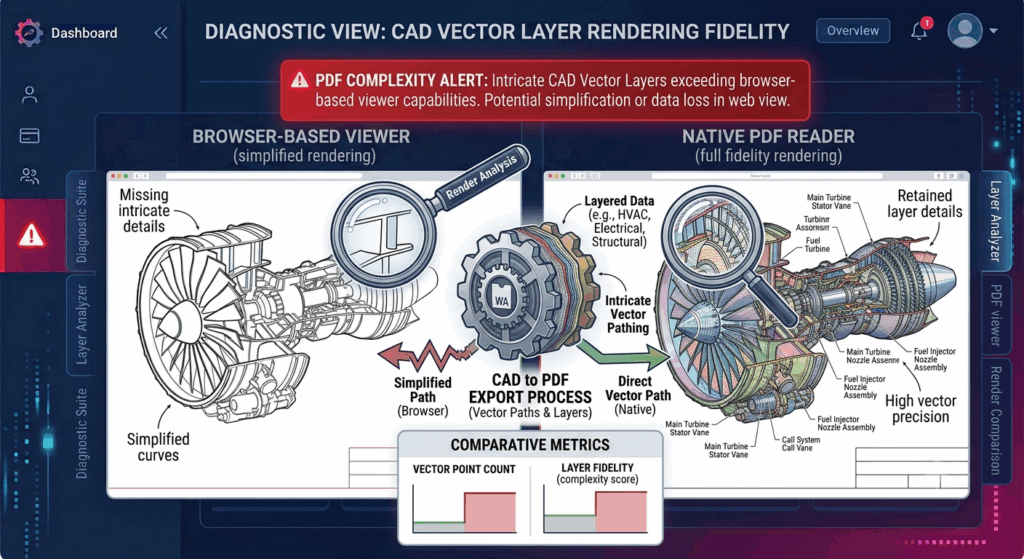
Professional CAD systems generate PDFs with complex geometric relationships, multi-layered drawing structures, technical annotations, transparency effects, clipping pathways, and accurate measurement information. Large building plans, mechanical assemblies, electrical schematics and industrial designs may comprise hundreds of thousands or even millions of vector objects on a single page. All these graphical instructions have to be interpreted and performed interactively by browser based PDF viewers. As documents becoming more complicated, renderers may simplify calculations, defer certain actions, or skip particularly demanding graphical parts to keep overall responsiveness.
The Influence of Layer Complexity
Engineering drawings often contain information segregated into different vector layers for structural components, electrical systems, plumbing layouts, dimensions, comments, reference grids, and production information. These layers are better for organizing documents, but add a lot to rendering complexity. The browser PDF viewers must handle the relationships between overlapping items, transparency settings, visibility rules and clipping regions in order to show the final document. Due to differences in rendering algorithms, certain viewers may not render every layer exactly as generated by professional CAD software, which may result in incomplete or visually incorrect results.
Memory and Performance Constraints
Rendering huge vector documents involves much processor time and memory allocation. Before the browser can paint the completed page, it must determine the meaning of every curve, polygon, hatch pattern, and annotation. Within the browser environment, we work within very carefully controlled resource constraints to keep all of the open tabs and apps running well. If the CAD documents are very complicated and above practical resource limits, the PDF viewers may load the pages slowly, zoom slower, fail to render completely or be less responsive to the user interface. These impacts are generally more pronounced in devices with low hardware resources than in high performance workstations.
Typical Problems in Rendering
A number of recurring problems is often encountered by users working with CAD-generated PDFs in web viewers. When you increase magnification, you may lose fine detail, intricate hatch patterns may not display properly, overlapping vector objects may display in the wrong order, and transparency effects may not be what they were in the original design. Some symbols, dimension lines or technical comments may not be visible at all. Large designs may load only partially before rendering stops and intricate pages may require lengthy processing time before they are fully displayed. Such behavior is typically a sign of rendering issues, not corruption in the PDF itself.
Making Technical Documentation More Compatible
Organizations publishing engineering drawings should test the output PDF files in several viewing environments before sending to clients or project teams. To make documents more compatible with browser-based viewers, optimize the complexity of documents when exporting, reduce extraneous graphical detail when practicable, and use standardized settings for PDF production. Keep browsers up-to-date and you also get to benefit from rendering improvements that come with newer PDF processing engines. For certain very comprehensive engineering projects, document validation on representative hardware configurations helps to catch rendering issues before deployment in production processes .
Strong Engineering Document Workflows
As browser technology continue to improve, integrated PDF viewers will be able to support increasingly advanced technical documents. Professional CAD drawings, however, will continue to challenge the limits of browser-based rendering. They are graphically very complex and demand high precision. The organizations who understand the interplay between CAD-generated vector layers, PDF rendering engines, browser resource management and document optimization, can build workflows that meet the accessibility needs with the required technical fidelity. With careful export configuration, extensive compatibility testing, streamlined document preparation, and an understanding of the limitations of browser rendering, engineering teams can produce vital technical documentation that is both widely accessible and visually accurate in modern web-based viewing environments.