Why Local IndexedDB Databases Frequently Corrupt When the Browser Process Is Unexpectedly Terminated
Why Local IndexedDB Databases Frequently Corrupt When the Browser Process Is Unexpectedly Terminated
IndexedDB has emerged as one of the most essential storage solutions for modern online applications, enabling browsers to store vast volumes of structured data directly on a user’s device. IndexedDB supports complex datasets, offline capability, cached application resources, and high-performance data retrieval, unlike simpler storage techniques meant for little chunks of information. IndexedDB is essential for building dynamic user experiences in the absence of network connectivity, and it’s used by everything from offline productivity apps and browser-based editors to project management platforms and progressive online applications. Under normal operating settings, it is reliable. Sometimes, however, developers and users experience database corruption if the browser process is unexpectedly ended. Local databases may be left in an inconsistent state after a sudden application crash or forced shutdown , operating system failure , or sudden power loss . The effect on application stability and data availability can be severe . Knowing how IndexedDB handles data gives an insight about the reason why sometimes the database is corrupted after an unexpected shutdown of a browser and how to avoid the dangers.
How IndexedDB Stores Data Explained
IndexedDB is a browser driven database which can store structured information efficiently and supports asynchronous operations. Rather than storing data as flat text values, it groups records into searchable, indexable, updateable and retrievable object stores that are highly performant. All the low level storage tasks like as transaction handling, indexing, caching, writing to disk etc. is handled by the browser. Applications connect with the database via standard programming interfaces and do not manage the underlying storage format directly. The design makes it easier to develop applications and lets browsers optimize their speed and keep data consistent.
Why Transaction Management Matters
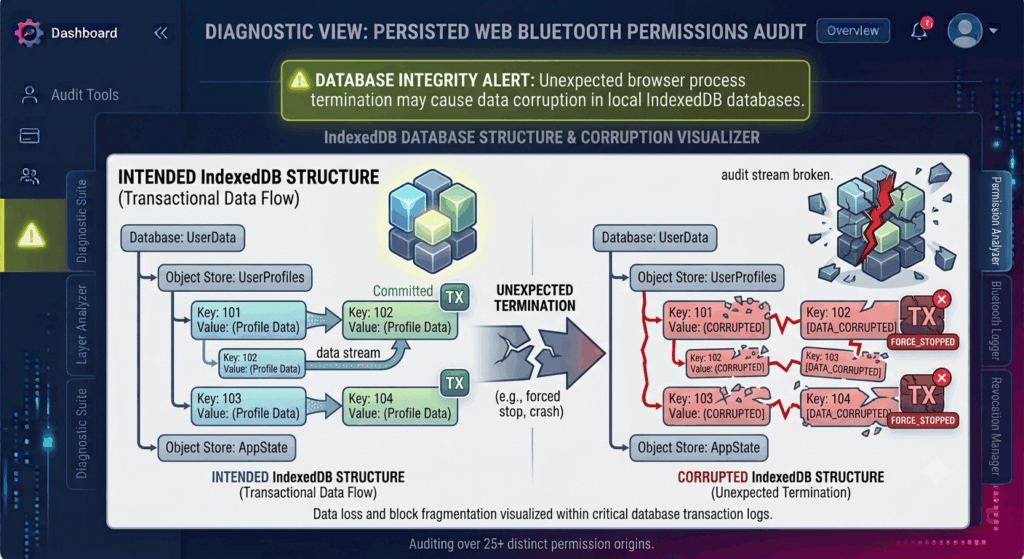
Any change made to an IndexedDB database is done in the context of a transaction. A transaction is a logically related series of activities . Either all the operations in a transaction complete successfully as a whole , or if an error occurs all are discarded . Thus, the consistency of the database is protected against partially stored information, which would have been stored permanently. Under normal circumstances, the browser carefully manages the execution of transactions, writing the changed records to local storage and confirming their successful completion before making any changes apparent to the application. This managed approach gives a high level of security against normal software failures and incomplete updates.
What happens when the browser is killed unexpectedly
When the browser closes regularly, current database activities are completed or safely stopped before releasing storage resources. This regulated shut down routine is interrupted with an unexpected conclusion. In case of system crash, forced termination of the application, restart of the operating system or power failure, the browser process can be killed instantly. Some internal modifications might not finish if database transactions are writing information at that time. Although current browsers include recovery capabilities, abrupt stoppage can sometimes lead to temporary inconsistencies in transaction metadata, indexes or cached records until repair operations are executed on the subsequent startup.
Browser Caching and Disk Writes Impact
Browsers, for performance reasons, don’t always write every change to a database straight to permanent storage the instant it happens. The browser can temporarily cache recently updated information in memory while preparing efficient disk operations. This approach saves storage overhead and increases the responsiveness of applications. However, if the browser process dies before cached changes are properly flushed to disk, recently updated information may not be fully retained. Depending on the point at which the interruption happened, the browser may find partial database structures that need to be recovered before the program may continue regular function.
Symptoms of IndexedDB Corruption Common
IndexedDB corruption usually causes the affected apps to behave strangely right after a restart. stored information can look incomplete . Old stored records can become unreachable. The app can fail frequently when opening its local database . other users noted unexpected data resets, and other users also found the application started slower while the browser tried to automatically check the database. In more severe cases, the browser may determine it is unable to recover, and may recreate the database from scratch. Any information stored locally will be lost, unless it was synced to remote storage.
How Browser Recovery Mechanisms Help You
Modern browsers have smart recovery mechanisms that limit the effect of interrupted database operations. When it starts up the browser checks the database for consistency and looks at the transaction logs to try to restore any incomplete operations if possible. Damaged indexes are immediately repaired and incomplete transactions are normally rolled back to ensure the database’s overall integrity. These recovery techniques successfully handle a wide range of interruption events without user intervention. But the system may be unable to recover automatically from significant disruptions to crucial storage activities, especially if the underlying storage hardware is also failing.
Local Data Protection Strategies
Developers can decrease the impact of unexpected browser shutdown by building applications that commit critical changes regularly through well-structured transactions, instead of postponing large quantities of updates. By breaking down separate operations into smaller transactions you limit the amount of work at risk in the event of sudden interruptions. Regularly syncing to secure remote storage also protects against permanent local data loss. Keeping browsers up to date benefits users as newer releases typically provide enhancements to database dependability, transaction processing and recovery methods. Reliable storage devices and stable operating systems significantly reduce the risk of interruption-related database problems.
Creating Strong Offline Web Applications
As more browser-based applications encroach on areas traditionally covered by desktop software, reliable local storage is increasingly crucial for productivity, collaboration and offline functioning. Nevertheless, like any database system, IndexedDB remains a powerful technology enabling these enhanced features, but it is dependent on proper transaction completion and stable operating settings. By knowing how browser storage engines handle transactions, caching, and recovery, developers can build apps that continue to work well even when unexpected pauses occur. By designing transactions carefully, synchronizing often, testing for compatibility constantly, and planning for recovery, organizations can build resilient web applications that will provide data integrity and reliable offline experiences across the most recent browsers and computing platforms.