How Deep-Linked URLs Behave Unpredictably When Passed Between Isolated Mobile Work Profiles and Personal Apps
How Deep-Linked URLs Behave Unpredictably When Passed Between Isolated Mobile Work Profiles and Personal Apps
Deep-linked URLs have become an integral feature of modern mobile application, as they allow users to open specific material without going through many menus. Deep links are a big productivity and user experience enhancer, whether it’s to access a shared document, join a video meeting, examine a product page or begin an individual discussion. However, mobile devices that split the business profile from the personal profile offer additional security limits that could alter the behavior of these relationships. They might discover that the same link opens several applications, or doesn’t open at all, or asks them to sign in many times, or opens a browser instead of the app they expected. Understanding the effect of profile isolation on deep link processing reconciles these contradictory behaviors and provides insights into the construction of more reliable cross-profile mobile processes.
Decoding Deep-Link URLs in Mobile Applications
A deep-linked URL specifies information that tells an application to access a specific screen, resource or action instead of just opening the home interface of the application. When clicked, a deep link can launch a specific document, customer record, support ticket, meeting invitation, or shared file directly instead of visiting the main page of an application. When a link is clicked, the mobile operating system determines which installed applications can handle that link and forwards the request to the most appropriate destination. Usually this routing process is done automatically and provides a seamless user experience when all the relevant permissions and programs are present in the same operating environment.
How Mobile Work Profiles Offer Isolated Environments
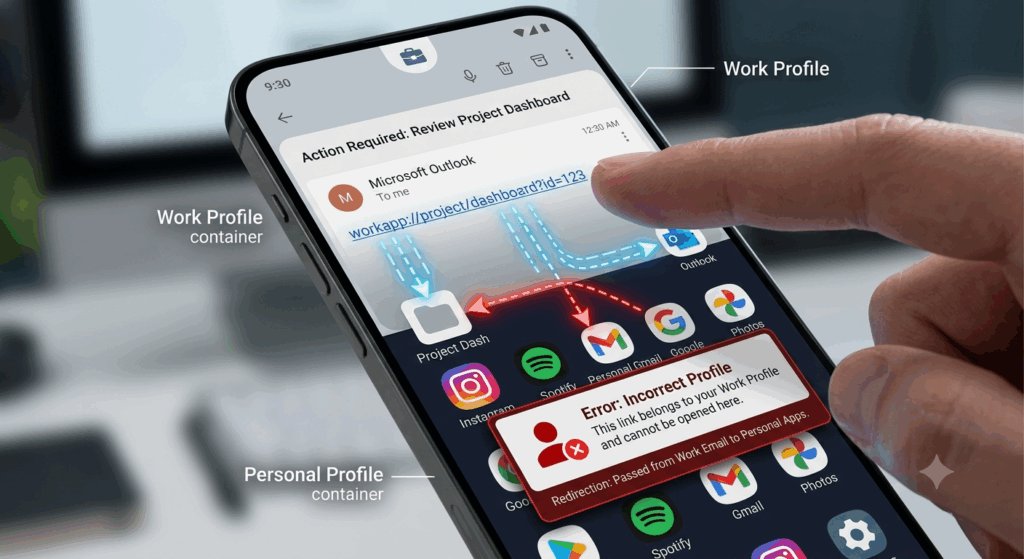
Work profiles use segregated storage, isolated permissions, and dedicated security rules to keep corporate apps apart from personal apps. So you can run both environments on the same physical device, but they are like two different application ecosystems with only limited connection between them . Each profile has its own installed programs, security settings, authentication sessions, and encrypted storage. This separation keeps commercial information away from personal applications, but it also lets enterprises enforce compliance standards without touching the user’s private data. This way the same applications loaded in both profiles can run independently of each other, as they are totally different execution contexts.
Why deep links act differently across profiles
The operating system has to figure out which instance of the program should handle the request when a deep-linked URL is sent between work and personal profiles. If the destination application is present only in one profile, the link may fail when opened from the opposite environment. Even when both profiles have the same apps loaded, the operating system could select one version of the application over another depending on security settings, profile ownership, or user preference. The authentication information kept in a profile is often inaccessible to the other, leading to repeated login requests even when the user recently authenticated elsewhere on the same device. These separate settings also explain why deep linkages may do surprising things even if they look the same.
Authentication Boundaries and Session Separation
Authentication is an important aspect of cross-profile deep-link activity. Work apps typically have secure login sessions that are completely different from personal app credentials. Authentication tokens held within an isolated environment cannot be automatically reused by a deep link passing from one profile to another. What this means is that programs will often ask you to re-authenticate before they can show you the material you asked for. Some security rules explicitly ban auto-sharing of credentials to minimize the risk of exposing corporate data to unauthorized entities. While these constraints enhance enterprise security, they can give the impression that deep linkages are malfunctioning when the underlying issue is actually profile-specific authentication isolation.
Registering an Application and Managing Links
When an application is installed it tells the operating system what kinds of links it can handle. For devices with separate work and personal accounts, separate registrations are performed in each environment. If both profiles have apps that are capable of handling a given deep-linked URL, then the operating system has to pick which one gets the request, based on existing routing regulations. This choice may be affected by administrative constraints, default application settings, or regulations of profile ownership. Differences in the versions of applications between profiles might add an extra layer of difficulty to routing as newer software may support additional link formats not available in earlier installations.
Administrative Controls and Enterprise Security Policies
Security controls are typically applied by work profile administrators to limit the flow of information between professional and personal contexts. These constraints can block direct sharing of documents, copied URLs, attachments or application data over profile boundaries. As a result, deep-linked URLs to protected corporate resources may only succeed when used in authorized work applications, and fail when used in personal software. Some enterprises also demand managed browsers to control business links independent of user choices. These administrative controls protect personal information, but can also cause inconsistent user experiences when the same link behaves differently depending on where it comes from.
Increasing cross-profile compatibility
Developers can also build their apps to deal with deep-link discrepancies by detecting profile boundaries gently. Good error handling, smart prompts for authentication, and informative notifications when users are redirected help them understand why the material they’re asking for isn’t available at that moment. Also, when the same software exists in both profiles, consistent link registration across application versions increases routing dependability. With careful configuration of application policies, admins may balance real-world usability and security, keeping access to critical workflows while also protecting the enterprise. The operating system improves cross-profile communication and application routing behavior over time via software updates that improve compatibility.
Create dependable mobile work processes in isolated profiles
As workplace mobility continues to take off, segregated work profiles will continue to play an important role in mobile security initiatives. Knowing the impact of profile separation on deep-link routing allows users, administrators, and developers to anticipate frequent compatibility issues before they create disruption in everyday productivity. Security rules are developed deliberately, authentication is well-managed, applications are configured carefully, and software versions are compatible, leading to more predictable cross-profile behavior. This understanding of the work and personal environments as two separate application ecosystems, vs. one shared platform, helps users understand why deep-linked URLs can sometimes be unpredictable, and develop workflows that are secure and reliable across modern mobile devices.