Diagnosing Micro-Stutters in WebGL Environments Triggered by Dual-Monitor Asynchronous Refresh Rates
Diagnosing Micro-Stutters in WebGL Environments Triggered by Dual-Monitor Asynchronous Refresh Rates
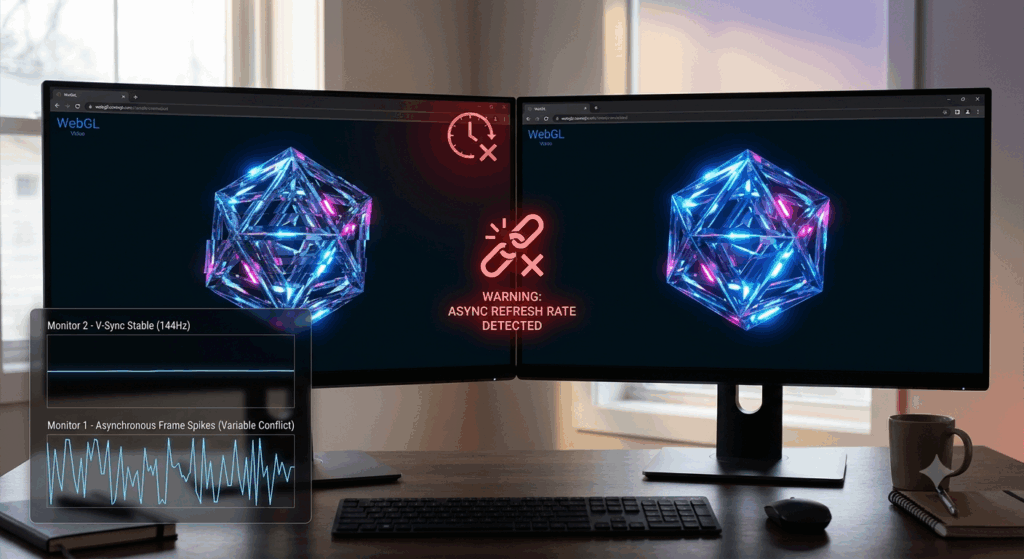
WebGL has revolutionized modern web applications by providing hardware-accelerated graphics directly in the browser, without requiring additional software installs. WebGL delivers a seamless graphical experience across a wide range of devices, from browser-based games and interactive simulations to powerful data visualization platforms and 3D design tools. But some users with dual monitors have reported very slight micro-stutters that can sometimes break up otherwise smooth rendering. These pauses are more evident when connected displays are set to various refresh rates, for example when using a 144Hz primary monitor and a 60Hz secondary display. Powerful graphics hardware can render complex scenes rapidly, but the asynchronous display timing creates synchronization difficulties that affect frame presentation. Understanding how browser rendering, graphics processing, and multi-monitor setups interact enables users to pinpoint the core causes of these performance discrepancies.
Understanding WebGL Render Pipelines
WebGL is a technology that utilizes the graphics processing unit in modern web browsers to produce sophisticated visual content efficiently. Every produced frame undergoes several steps like scene setup, shader execution, geometry processing, texturing and finally composition before it hits the display. Timing techniques that synchronize rendering with the display refresh cycle are employed by browsers to coordinate these activities. In an ideal world, this synchronization results in smooth animation with a steady supply of frames. But when you have numerous displays each refreshing at various frequencies, coming up with a scheme to synchronize frame presentation is a much more difficult problem. Each monitor is requesting updates on its own independent time schedule.
Dual-Monitor Setups: Timing Difficulties
A dual monitor workstation is commonly set up with monitors that have distinct resolutions, refresh rates, color capabilities and connection standards. The graphics engine can actually create frames for both screens at the same time . But each monitor refreshes independently , depending on its unique hardware specs . A 60Hz display refreshes every 16 milliseconds, while a 144Hz panel refreshes at a substantially faster rate. This mismatch means that the operating system and graphics driver have to synchronize the rendering across out of sync time intervals. Sometimes irregular frame pacing might occur on a single display for browser based WebGL apps, because the graphics subsystem is still servicing presentation requests for both connected monitors simultaneously.
What Causes Micro Stutters Instead Of Constant Slowdown
Micro-stutters are not the same as overall performance degradation, since the average frame rate tends to remain quite high, even when there are obvious breaks in visual smoothness. Instead of a long period of low performance, customers see short glitches where one or more frames are delivered slightly late. This causes irregular delivery intervals that can be seen by the human eye, even if the overall frame rate looks appropriate. In dual-monitor setups, asynchronous refresh scheduling can sometimes cause the display of a frame to be delayed while the graphics pipeline synchronizes output between monitors with differing refresh rates. These small pauses are most noticeable when the camera is moving, objects are rotating, or you are scrolling continuously in WebGL apps.
Syncing with Display Browser Frame Scheduling
Modern browsers try to synchronize WebGL rendering with the display’s refresh timing to reduce visual artifacts and make animations more consistent. Internal rendering schedulers work with graphics drivers and operating system display managers to figure out when to make new frames. In multi-monitor setups, browsers must work under the scheduling limitations imposed by the two displays at once. Occasional anomalies in frame pacing may occur if timing decisions are not aligned with the refresh interval of the monitor. Although browsers are progressively improving such scheduling algorithms, asynchronous refresh systems are still more complicated than single monitor setups with predictable temporal characteristics.
Mixed Refresh Environments and Graphics Driver Behavior
Graphics drivers are the communication layer between the display hardware and the browser rendering engines. They handle graphics resource allocation, scheduling the presentation of frames and synchronizing rendering across attached monitors. Mixed refresh rate configurations challenge drivers to reconcile conflicting timing needs, without adding unwanted latency or visual anomalies. Driver optimization quality is dependent on the hardware design, operating system updates, and the complexity of the graphics workload. If the drivers are old or unsuitable, the efficient scheduling could be a challenge and micro-stutters may be more likely to happen during longer WebGL sessions with demanding graphical content or frequent display changes.
Other Things That Make Frame Pacing Issues Worse
Asynchronous refresh rates are a major cause of frame pacing anomalies, but there are a number of other elements that can exacerbate the situation. Other apps running in the background that use visual resources may be competing with WebGL rendering for processor and graphics scheduling time. Rendering overhead that affects frame consistency can be introduced by browser extensions that offer constant visual updates. Long rendering sessions can also be impacted by hardware acceleration settings, memory use and thermal management systems. Even desktop animations running on the secondary display can sometimes impact the overall graphics schedule, making isolated WebGL micro-stutters more obvious than you might anticipate.
Rendering Consistency: Practical Techniques
Systematic maintenance and careful display configuration can help users with sporadic WebGL micro-stutters render more consistently. Keep your graphics drivers and browsers up to date to guarantee you have all the latest performance enhancements for modern multi-monitor environments. Having background graphics activity that is not needed means the rendering pipeline has additional resources to give to active WebGL apps. Fixed display resolutions and compatible refresh rate combinations could also help make it even easier to synchronize connected monitors. Testing WebGL apps individually on each monitor can also help to verify if the reported performance inconsistencies are caused by the asynchronous refresh timing.
Building Stable WebGL Workstations with Multiple Monitors
As browsers, graphics hardware and display technologies continue to evolve, support for varied refresh rate settings will be even more polished. But for continuously smooth WebGL performance, it still depends on maintaining balanced system configurations, efficient graphics drivers, optimized browser environment, and well-managed background workloads. Developers should also create WebGL apps with steady frame pacing rather than assuming the same display characteristics on all user computers. Understanding the impact of asynchronous refresh rates on browser rendering pipelines, graphics scheduling, and frame presentation timing will enable users to better diagnose micro-stutters and build robust multi-monitor workstations that can deliver smooth, responsive WebGL experiences during demanding graphical workloads.