Why Incremental Cloud Backups Fail on Frequently Modified Large Database Files Stored in Encrypted Containers
Why Incremental Cloud Backups Fail on Frequently Modified Large Database Files Stored in Encrypted Containers
Incremental cloud backups are a popular choice because of the benefits of reduced storage use, reduced upload times, and more efficient backups (by sending just the data that has changed since the last backup). This works incredibly well for numerous papers, photos and common files. However, customers often face considerable issues when they want to employ incremental backup methods for huge database files in secured containers. Small changes to the database can cause cloud backup services to believe the entire encrypted container is a brand new file, leading to surprisingly massive uploads and long synchronization periods. Learning how database activity, encryption techniques and cloud backup technologies interact helps users to develop more effective data protection plans and to avoid recurring backup failures.
How Incremental Backups Work
Incremental backup methods copy only the changes made since the last successful backup, instead of repeatedly replicating all files . Backup software looks at file metadata, timestamps, checksums or individual data blocks to know exactly what needs to be transferred. It transfers only the changed portions, and so drastically reduces bandwidth and storage requirements, and allows backups to be made often with little performance impact. This strategy works particularly well when files change just minimally between backup sessions. However, incremental backups are only as effective as the backup software’s ability to correctly identify unmodified sections of data being preserved.
How Large Database Files Change Over Time
Database files are considerably different from typical documents . During normal functioning , database files are constantly being updated internally . Even a simple transaction can change indexes, tables, transaction logs, metadata or storage allocation structures spread over the database file. Such changes are generally done automatically as part of normal maintenance , record updates , or consistency checks . The apparent information that the user changes may be minimal but the underlying file structure can undergo extensive internal alterations. As databases grow larger, these background changes happen more frequently and typical file-based backup systems have difficulty detecting changes efficiently in an incremental fashion.
Encrypted Containers Impact on Backup Detection
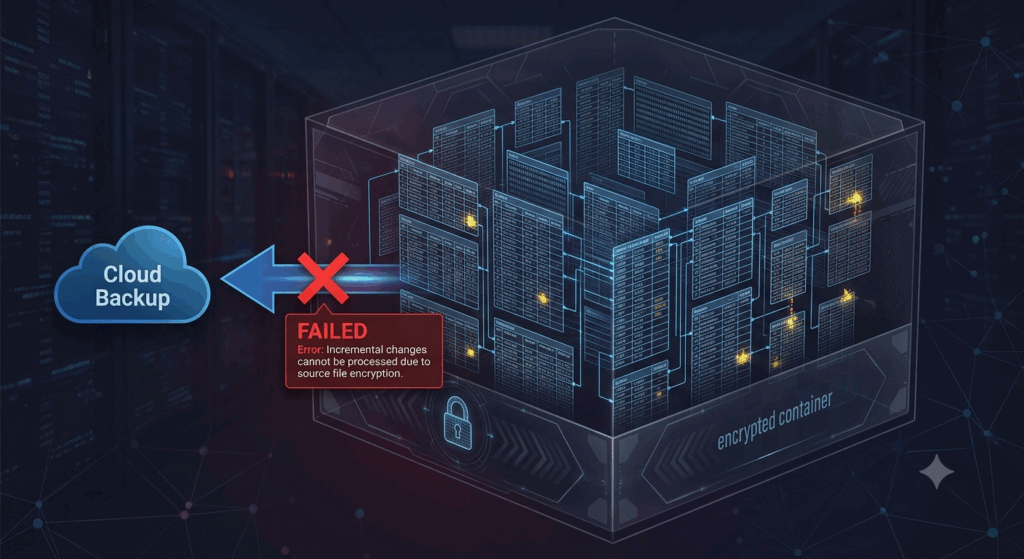
Encryption Scrambling data such that it looks like random data, unless you have the right key to unscramble it, is what keeps sensitive data protected. If big databases are stored in encrypted containers, then even a slight change to the underlying database can have a drastic impact on the encrypted output. To strengthen security, many encryption algorithms purposely cause a complete shift in the pattern of the encrypted data after relatively small modifications. Consequently, backup software that compares the contents of encrypted containers sometimes finds that the entire file has changed even while only a small piece of the original database has been altered. This feature essentially limits the applicability of typical incremental backup techniques.
Why whole files are often uploaded again
Whether they do file level or block level backup is often a function of the underlying architecture of the cloud backup systems. When encrypted containers undergo broad changes across several data blocks, backup software can lose the capacity to find meaningful similarities with prior versions. The backup application does not upload just the changed parts, but rather it sees the encrypted container as a brand new object and uploads the entire thing. This behavior greatly increases backup time , bandwidth consumption and cloud storage activity for multi-gigabyte database files . These repeated complete uploads may be misconstrued for software faults by users, but they are predicted consequences of the interaction between encryption and incremental backup techniques.
Additional Challenges for Active Databases
Other problems are caused by frequently changing databases . Backups may start while transactions are still open . Constant writing activity means that file contents are changing, and if the backup is running simultaneously, this increases the likelihood of incomplete snapshots or inconsistent database states unless effective coordination is in place. Temporary transaction logs, automatic indexing, background optimization chores, and maintenance operations lead to continuing file alterations. With upgrades like this happening so frequently , it gets harder and harder for incremental backup software to find stable reference points from which changes can be reliably detected . This can cause erratic backup performance even with relatively tiny amounts of user-generated data.
Why Detect Changes at the Block Level?
Some of the more powerful backup software can track changes at the block level, rather than at the file level, which can enhance efficiency. Block based systems do not look at the whole file name or last modified date, but at smaller pieces of information stored independently. This approach works well for many huge files, but is less effective when encryption causes changes to spread through vast areas of the container. If the encrypted blocks differ greatly from prior versions, even more advanced block comparison algorithms may find that the most reliable way to synchronize is to fully replace the block. Thus, the efficiency of the backup is often determined by the properties of the encryption, rather than by the expertise of the backup engine itself.
Making backups more reliable
Users of encrypted database containers can boost backup efficiency by planning ahead and performing regular maintenance. Separating database files from other data makes it easier to schedule backups and reduces wasteful synchronization effort. Backups are done when the database is less busy so fewer changes are happening while the backup is running. Regular integrity checks of backups also help to uncover performance issues before they impair recovery preparedness. The probability of frequent backup interruptions, and excessive retransmissions, is further reduced, and consistency improved, by organizing the backup operations around stable database states rather than continuous active updating.
Formulating a Successful Long Term Backup Plan
If you have regularly changing databases that sit inside encrypted containers, you have to balance security, performance and recoverability. You can not just rely on normal incremental backup approaches. By understanding how encryption affects data, how databases change internal structures and how cloud back-up software identifies changes, users may create more predictable protection plans. Regularly check backup performance, schedule synchronization jobs judiciously, organize storage effectively, and conduct periodic recovery testing to ensure reliable long-term data protection. As databases grow in size and encrypted storage becomes more common in both professional and personal environments, it will be important to develop backup workflows that take these technical interactions into account to guarantee dependable cloud-based data protection with minimal storage consumption and avoidance of repeated backup failures.