Migrating Multi-Factor Authentication Tokens From Aging Hardware Keys Without Triggering Fraud Lockouts
Migrating Multi-Factor Authentication Tokens From Aging Hardware Keys Without Triggering Fraud Lockouts
Hardware security keys have become one of the most trusted ways to secure internet accounts with multi-factor authentication. They are highly effective against phishing , credential theft , and unauthorized access to accounts because they require physical presence of a registered device during the login process . However, users may update hardware keys as they get old due to wear, compatibility issues, changing security requirements, or the necessity to support newer devices. Migrating credentials from an outdated security key to a new device is a delicate procedure. Poor planning for migration can result in automatic fraud detection, temporary account limits, or complete security lockouts. Knowing how authentication systems detect changes in devices can let users replace outdated hardware safely without losing access to key accounts.
Understanding Hardware Multi-Factor Authentication
Unlike software-based authentication approaches, hardware security keys hold cryptographic credentials in safe elements that are tamper-resistant and cannot be extracted or duplicated. Supported services link the hardware key to the user’s account during registration using unique cryptographic information. All future authentication requests must verify that the registered device is in the user’s possession before providing access. Hardware keys are a big step forward in account protection, as they are based on securely stored credentials, not passwords. That also implies that when you replace a security key, you have to register the new device with every service instead of copying credentials immediately from the old hardware.
The need to replace hardware keys at some point
Hardware security keys are made to last a long time, but they are not designed to stay forever. Repeated physical use can progressively damage USB connections, contact points or protective covers. New computers and mobile devices could include connectivity standards that your old gear can no longer handle efficiently. Periodic upgrades are also encouraged by firmware enhancements, stronger encryption algorithms, and more interoperability with new authentication standards. In some cases, users change working keys to keep backup devices or to unify authentication on various personal devices. If you plan the replacement well before the hardware fails, you are far less likely to experience unanticipated problems with account access.
How Systems for Fraud Detection Assess Changes in Devices
Modern authentication technologies continuously examine login activity to detect any action that deviates from typical usage patterns. If you’re changing devices, locations, operating systems, or network settings, then registering a new hardware key immediately after such a change may seem like suspicious activity to automated security systems. This perceived risk is further heightened if existing authentication methods are removed in conjunction with adding new credentials quickly. Many fraud detection algorithms take into account login history, geographic consistency, browser features, device fingerprints, and timing of authentication before deciding whether extra verification is necessary. Knowing these automatic assessments can enable users more easily do migrations without accidentally tripping protective security measures.
Provisioning Accounts Prior to Migration
Don’t rush to replace a hardware key. A successful migration starts with careful planning. Users should ensure that all existing authentication methods still work fully before changing anything. Reviewing the registered recovery alternatives helps ensuring that you have other ways to get to your account in case you be asked to verify in an unexpected way during migration. Critical backup authentication mechanisms must be kept enabled throughout the full transition period and not be disabled prematurely. If you carry out the preparations while still having the original hardware key you have more flexibility because the authentication is still possible even if there are temporary problems with the registration of the new device.
Registering Spare Keys without Deleting Existing Keys
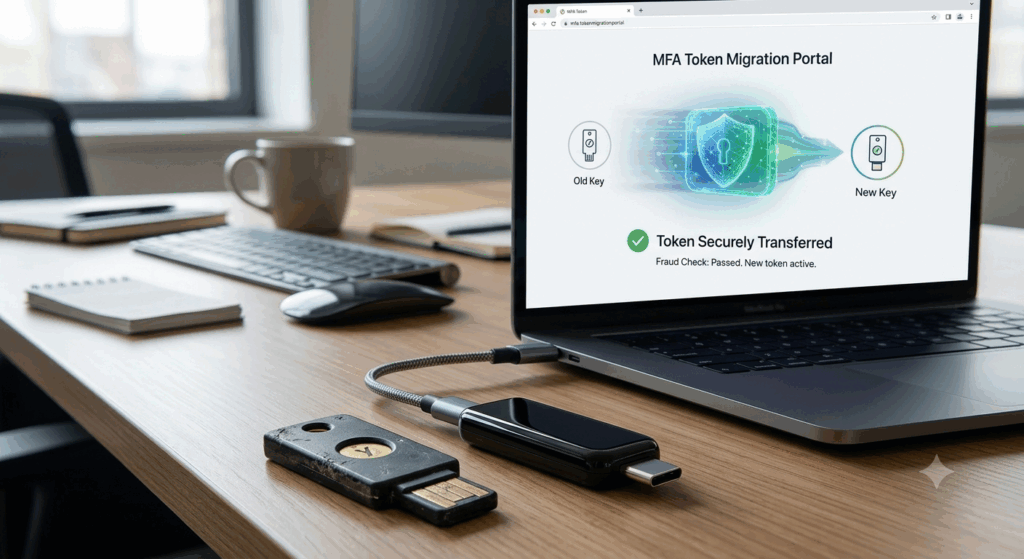
The best way to do this is to add the replacement hardware key first, then remove the original device from any accounts. Having both authentication methods active at the same time gives uninterrupted access and allows users to check that everything works OK over several login sessions. Validation of authentication with the new key gives confidence that registration was successful before retirement of the older hardware. This overlap further decreases the security risks of unforeseen hardware failures during the migration. Then you can start decommissioning the aging key from each account one by one when you see that it is working reliably over time, without affecting the normal authentication process.
How to Avoid Common Migration Blunders
There are a number of preventable issues that often result in temporary account lockouts during authentication transfer. Changing many security settings at once is unnecessarily difficult and could lead to additional verification procedures. If you are traveling or utilizing an unknown network, the location changes could be flagged as suspicious by automated security systems. If the backup authentication methods are ignored, users are left unprotected in the case of unanticipated issues with the primary migration process. Also, deferring verification of new hardware until the older credentials are removed makes recovery more difficult. We carefully sequence each stage of the migration to reduce unwanted security alarms, while ensuring reliable access to the accounts.
Long-Term Authentication Dependability
Upgrading old hardware is a great opportunity to improve overall authentication methods, not just replace an older security key. Having a few registered authentication devices means you are less reliant on any single piece of hardware. Regularly evaluating the registered security measures helps to find outdated devices that should no longer have access to your account. Backup authentication hardware is also secure stored to provide resilience to hardware damage or unintentional loss. By regularly checking that the registered devices are still functioning correctly, you can ensure that replacements are done in a controlled manner and not because of an unexpected hardware failure.
Developing a Sustainable Hardware Key Management Strategy
Hardware security keys are a significant investment in protecting your accounts over the long term, but to be effective, they need to be thoughtfully lifecycle managed. Users who check authentication settings periodically, maintain backup access methods, proactively upgrade older hardware and plan migrations properly have less disruptions while continuing to maintain good account security. As authentication methods evolve, and fraud detection systems get more sophisticated, structured migration procedures will only become more beneficial. By preparing accounts in advance, registering replacement keys before retiring existing hardware, maintaining recovery options, and avoiding unnecessary simultaneous security changes, users can successfully migrate multi-factor authentication tokens, minimize the possibility of automated fraud lockouts, and ensure continued access to their most important digital accounts.