How Airtable’s Shared View API Rate Limits Break Public-Facing Web Dashboards
How Airtable’s Shared View API Rate Limits Break Public-Facing Web Dashboards
One of the most common use of Airtable is as a lightweight backend for dashboards that are accessible to the public, particularly via shared views and API-based interfaces. On the other hand, as these dashboards grow or face unexpected surges in traffic, developers often come upon a key issue: the shared view API rate restrictions of Airtable tend to deteriorate or entirely disrupt data display. As a consequence, end users are left with dashboards that are either incomplete, contain outdated data, or completely fail to load. When it comes to public web applications, the issue becomes more apparent when numerous users concurrently access the same interface that is driven by Airtable. Airtable’s rate-limiting methodology is not always suitable for high-frequency public consumption, despite the fact that it is dependable for use with internal tools and moderate use. In order to keep dashboards stable, it is vital to have a solid understanding of how these restrictions are enforced and how they interact with frontend request patterns. A considerable reduction or elimination of these failures is possible with the implementation of appropriate design modifications.
Access to the Airtable Shared View API and How It Operates
A simplified, read-only interface to base data is made available via Airtable shared views. This interface may be used without full authentication being required. Because of their ease of embedding and the fact that they need a small amount of backend infrastructure, these views are often used to power lightweight dashboards. Airtable provides a snapshot of the view’s current dataset in a structured manner whenever a request is made to it. On the other hand, this access is still subject to internal rate constraints that are intended to safeguard the steady operation of the system. Each and every request uses up API capacity, regardless of whether it is unauthenticated or disclosed to the public. As the volume of traffic rises, these restrictions may be achieved in a short amount of time. When it comes to detecting performance problems in dashboards, having a solid understanding of this request-response mechanism is essential.
The Reasons Behind the Initiation of Rate Limits in Public Dashboards
Dashboards that are accessible to the public provide a special problem due to the fact that numerous users may simultaneously initiate requests to the same shared view. On the other hand, public dashboards are susceptible to experiencing unanticipated surges in traffic, in contrast to internal tools, where use is predictable. Every time a page is loaded or refreshed, a new API request to Airtable can be triggered. It is possible for the number of requests to surpass the maximum that Airtable allows when a large number of users use the dashboard at the same time. Following the occurrence of this event, Airtable will start limiting the number of queries or giving error answers. This results in dashboard components that are either missing or only partly loaded. Despite the fact that the method is intended to prevent misuse, it has the potential to mistakenly limit genuine traffic on a large scale.
The Influence of Real-Time Rendering on the Pressure on User Interfaces
A significant number of contemporary dashboards make an effort to present data in real time, continually asking Airtable for changes. Although this assures that the data is fresh, it adds a large amount of burden to the API. Every polling interval brings in new requests, which further increases the amount of traffic load. Multiple users conducting polls simultaneously are responsible for the exponential rise of requests in dashboards that are visible to the public. This has the potential to swiftly surpass rate restrictions, even when traffic volumes are mild. The consequence is a decrease in performance as well as an uneven display of the data. Maintaining a careful equilibrium between real-time rendering and backend capacity is essential. It eventually becomes a significant cause of instability if optimisation is not performed.
Gaps in the Caching System and Repeated Data Facing
There is a lack of adequate caching between frontend requests and Airtable, which is one of the most prevalent reasons of rate limit exhaustion. The same dataset is requested several times if each user session individually retrieves data from Airtable. This results in the dataset being requested multiple times. API use is increased needlessly as a result of this duplication. On account of the fact that Airtable shared views were not developed with high-frequency public caching in mind, each and every request is considered to be new. Dashboards are completely dependent on the responsiveness of Airtable’s API since they do not have a caching layer. In addition to increasing the chance of throttling, this results in the creation of unneeded load. Having effective caching solutions is very necessary in order to cut down on unnecessary queries.
Comparing the limitations of shared views to those of full API access
When opposed to full API access, Airtable shared views are purposefully rendered more straightforward. However, rather than being built for high-performance data transfer, they are designed for ease of sharing. As a consequence of this, they do not possess the capabilities of sophisticated query optimisation, pagination control, or batch optimisation. This makes them less efficient for large-scale dashboard use. Each request retrieves a full dataset rather than a filtered subset optimized for frontend needs. This increases payload size and processing time. These limitations become more pronounced as data volume grows. Understanding these constraints is important for designing scalable systems.
How Rate Limiting Breaks Frontend Dashboards
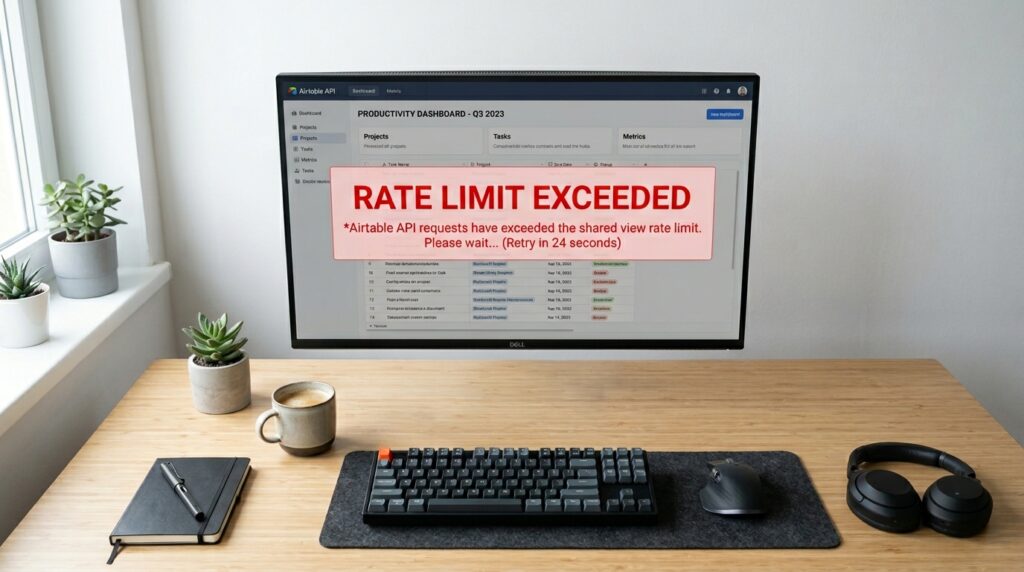
When Airtable rate limits are triggered, the API may return errors or delay responses. On the frontend, this often manifests as empty tables, broken charts, or infinite loading states. Because dashboards typically rely on synchronous data rendering, any API failure directly impacts UI stability. In some cases, partial data is displayed, leading to inconsistent or misleading visualizations. Users may not immediately understand that the issue is rate limiting. Instead, it appears as a general dashboard malfunction. This makes debugging more difficult and increases perceived unreliability.
Fixing Rate Limit Issues with Backend Proxy Layers
One of the most effective solutions is introducing a backend proxy layer between the frontend and Airtable API. This proxy aggregates requests and reduces direct calls to Airtable. Instead of each user triggering a new API request, the backend serves cached or pre-fetched data. This significantly reduces API load and prevents rate limit exhaustion. The proxy can also implement request batching and intelligent refresh intervals. By centralizing data access, dashboards become more stable and scalable. This architecture is essential for public-facing applications.
Implementing Strategic Caching for Shared Data
Caching is critical for reducing Airtable dependency in high-traffic environments. Storing shared view data temporarily in memory or a database reduces repeated API calls. Short caching intervals ensure data remains reasonably fresh while minimizing load. For most dashboards, real-time precision is not required, making caching an effective trade-off. Cache invalidation strategies can be used to refresh data at controlled intervals. This prevents unnecessary API usage while maintaining usability. Proper caching design is one of the most important performance optimizations.
Best Practices for Scalable Airtable-Powered Dashboards
Building reliable public dashboards with Airtable requires careful planning around API usage and data flow. Minimizing direct frontend calls reduces exposure to rate limits. Introducing backend aggregation layers improves stability under load. Implementing caching ensures consistent performance even during traffic spikes. Reducing unnecessary polling frequency helps control request volume. Structuring data to minimize full-table reads improves efficiency. By following these best practices, developers can build Airtable-powered dashboards that remain stable, responsive, and scalable even under heavy public traffic conditions.